
Most budgets fail because they’re vague. You set a grocery limit and a vague idea of “spending less,” but half your money still disappears into categories you never thought about. By the end of the month you’re left wondering where it went.
Zero-based budgeting fixes that completely.

With zero-based budgeting, every single dollar you earn gets assigned a specific job before the month begins. When you’re done building your budget, income minus expenses equals exactly zero. Not because you have no money left but because every dollar already has a plan.
This guide walks you through exactly how zero-based budgeting works, includes a real worked example with dollar amounts, and gives you a free template you can use immediately.
What Is Zero-Based Budgeting?
Zero-based budgeting (ZBB) is a method where you start each month from zero and assign every dollar of income to a specific category needs, wants, savings, debt until nothing is left unassigned.
The math: Income All Assigned Expenses = $0
This doesn’t mean your bank account hits zero. It means every dollar has been deliberately allocated somewhere before you spend it. The money assigned to “groceries” goes to groceries. The money assigned to “savings” moves to savings on day one. Nothing floats around unaccounted.
Originally developed as a business budget method in corporate finance, zero-based budgeting has become one of the most effective personal budgeting frameworks because it eliminates the single biggest cause of budget failure: unassigned money getting spent on nothing in particular.
Zero-Based Budgeting vs 50/30/20 Rule

The 50/30/20 rule gives you three broad buckets needs, wants, savings and lets spending within those buckets be flexible. It’s the easiest method to maintain and requires minimal tracking.
Zero-based budgeting gives every dollar a specific job within those buckets. It requires more setup but produces more control. Every category has a named limit, and you know exactly when you’ve hit it.
Best choice: 50/30/20 for beginners who want simplicity. Zero-based budgeting for people who’ve tried looser methods and still overspend in specific categories.
Many people use both starting with 50/30/20 to understand their overall spending pattern, then switching to zero-based budgeting once they want more precision.
How Zero-Based Budgeting Works: Step by Step
Step 1: Write Down Your Monthly Take-Home Income
Start with your actual take-home pay after taxes, insurance, and any deductions. This is the number that hits your bank account, not your gross salary.
If your income varies month to month, use your lowest expected month as the baseline. Whatever you actually earn above that becomes bonus money to assign later.
Include every income source: salary, side hustle income, rental income, child support everything coming in.
Example: $3,200/month take-home
Step 2: List Every Single Expense
Go through the last two to three months of bank and credit card statements. Write down everything you spent money on — every bill, every subscription, every coffee, every impulse purchase.
Organize them into a monthly expense tracker list:
Fixed monthly expenses (same amount every month): Rent/mortgage, car payment, insurance premiums, loan minimum payments, internet, phone bill, subscriptions
Variable monthly expenses (amount changes): Groceries, dining out, gas, entertainment, clothing, personal care, household supplies
Irregular expenses (annual or quarterly): Car registration, yearly subscriptions, medical copays, birthdays, holiday gifts
For irregular expenses, divide the annual total by 12 and include that monthly amount in your budget as a sinking fund contribution.
Step 3: Assign Every Dollar to a Category

Now the core of zero-based budgeting: take your income and assign specific dollar amounts to each category until you reach zero.
Real worked example: $3,200/month
Fixed needs:
- Rent: $1,000
- Utilities: $120
- Internet: $60
- Phone: $45
- Car insurance: $80
- Minimum debt payments: $150
- Fixed needs total: $1,455
Variable needs:
- Groceries: $350
- Gas: $120
- Medications: $30
- Variable needs total: $500
Wants:
- Dining out: $150
- Entertainment/streaming: $50
- Clothing: $75
- Personal care: $60
- Coffee shops: $40
- Misc fun: $70
- Wants total: $445
Savings and financial goals:
- Emergency fund: $200
- Extra debt payment: $200
- Vacation sinking fund: $100
- Car maintenance sinking fund: $100
- Savings total: $600
Total assigned: $3,200 Income Assigned = $0 ✓
Every dollar has a job. Nothing is floating.
Step 4: Handle the “Leftover” Problem
When you first do this exercise, one of two things happens:
You assign everything and have money left over. This is not a problem it’s an opportunity. Assign the extra to savings, debt payoff, or a sinking fund. Every dollar needs a category. If you don’t assign it, it will get spent on nothing meaningful.
You run out of income before you’ve covered everything. This is important information it means you’re currently spending more than you earn. Go back through your wants category first. Cut amounts until the math works. If cutting wants isn’t enough, look at fixed expenses that can be reduced a cheaper phone plan, negotiated bills, a streaming service paused for the month.
The zero-based budget forces this conversation to happen on paper before the month starts not as a surprised look at a bank statement at month end.
Step 5: Track Throughout the Month

Building the budget is half the job. The other half is tracking spending against it throughout the month.
A monthly budget spreadsheet or monthly expense tracker makes this manageable. As you spend, you record each purchase in the relevant category and watch the remaining balance in real time.
When the “dining out” category hits zero on the 20th, you know and you can make a decision. Cook at home, borrow from another category consciously, or skip the dinner. The choice is yours, but it’s an informed choice rather than an accidental one.
Step 6: Review and Reset at Month End
At the end of every month, review what happened. Which categories did you stay within? Which went over? Why?
Then reset for next month. Zero-based budgeting starts fresh each month you don’t carry over last month’s categories unchanged. You build a new budget based on what you know this month will look like.
Some months need a Christmas budget line. Some months have a car service. Some months have an extra payday. Zero-based budgeting adjusts to real life because you rebuild it from scratch each time.
Zero-Based Budgeting for Families
A family budget using zero-based method follows the same framework but with more income sources and more spending categories to assign.
For couples or families, zero-based budgeting works best when both partners build it together. Combine all income sources. List all expenses including those each partner manages separately. Assign every dollar collectively.
Key family-specific categories to include in your family budget:
- Childcare and school expenses
- Kids’ clothing (separate from adult clothing costs and timing are different)
- Family entertainment and activities
- Medical copays and prescriptions per family member
- Kids’ activities and sports fees
- Family vacation sinking fund
For a household managing two incomes, the combined zero-based budget also clearly shows whose paycheck covers which categories eliminating the “I thought you paid that” problem.
Free Zero-Based Budget Template
How to Download the Free Template
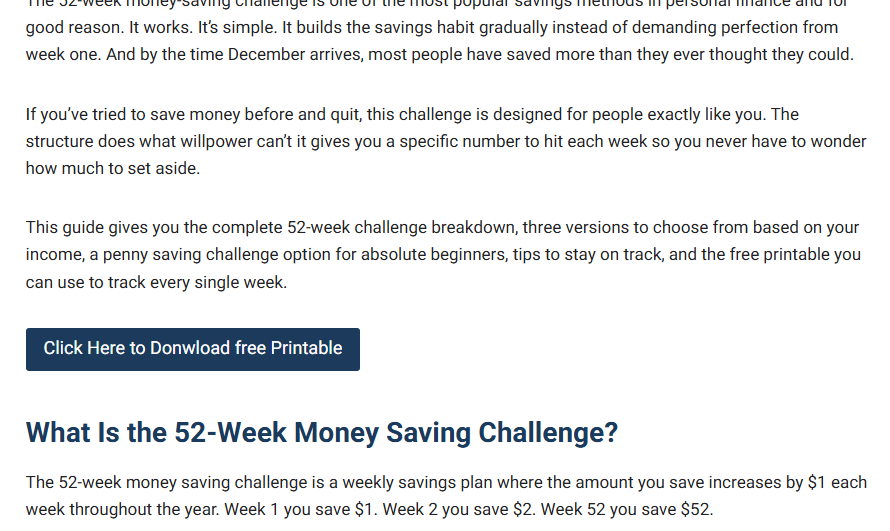
Step 1:
Scroll down to the button in this article and click “Click Here to Download Free Printable”
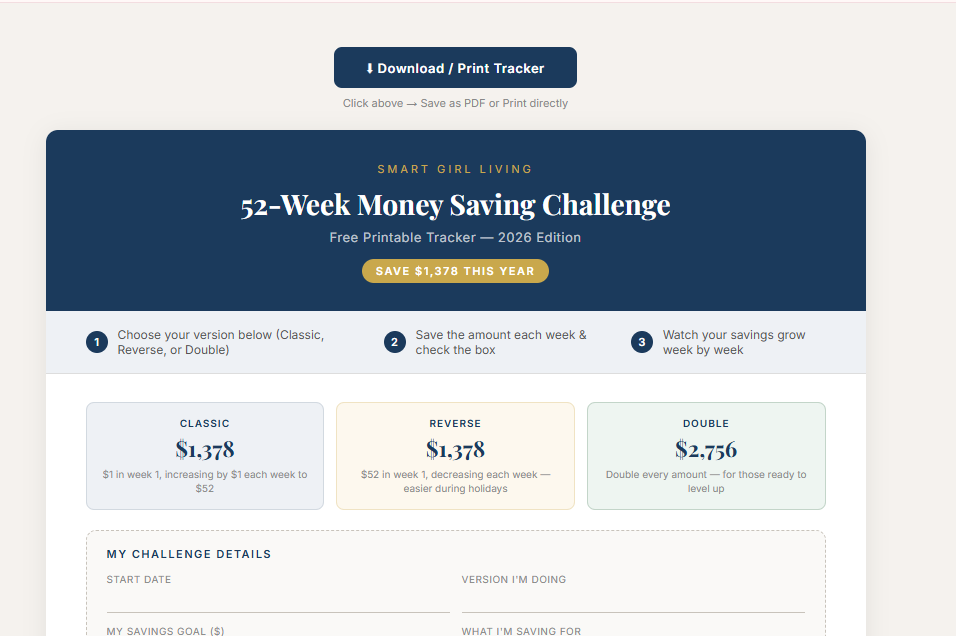
Step 2:
A new page will open showing the printable tracker. Click the “Download / Print Tracker”
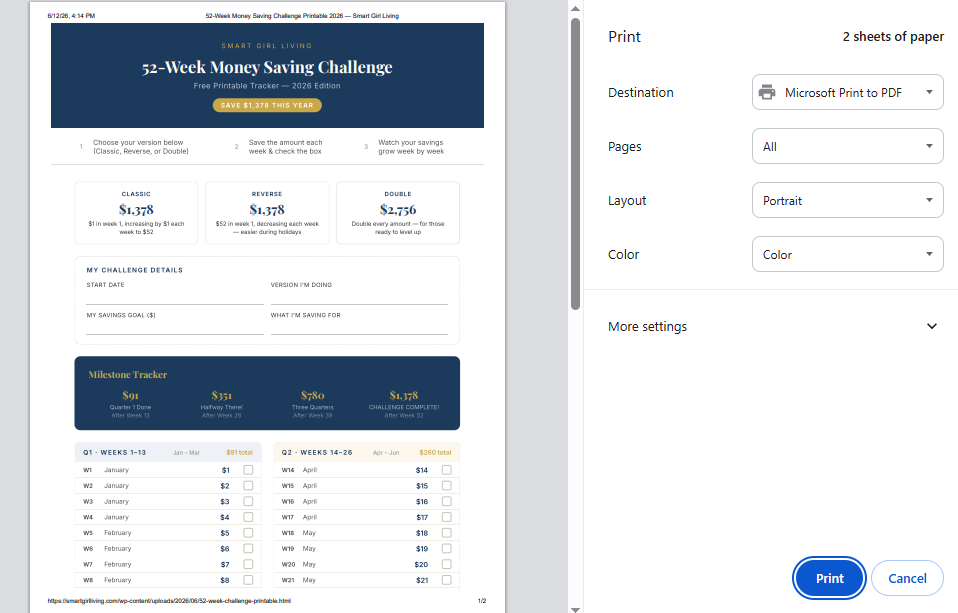
Step 3:
Your browser’s print window will open. Make sure Destination is set to “Microsoft Print to PDF” and Color is set to “Color”. Then click Print.
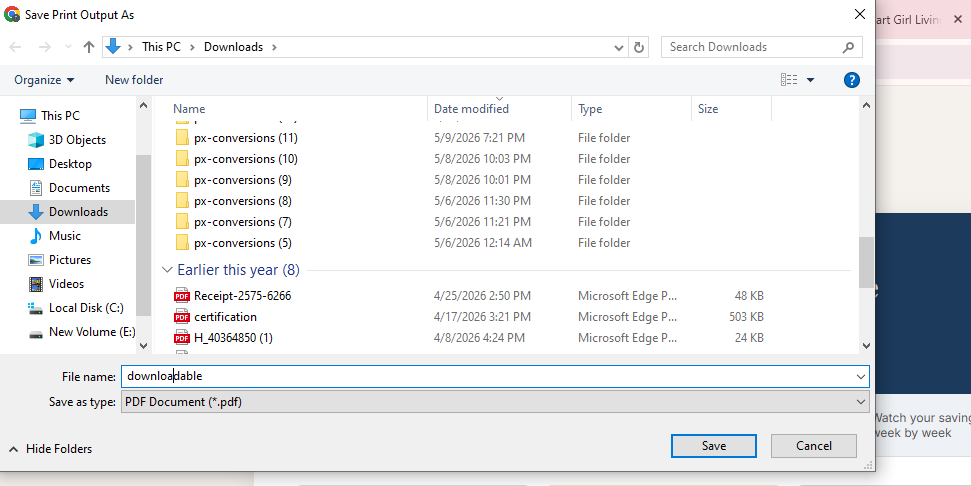
Step 4:
A save dialog will open. Choose your folder, name the file (example: “52-week-challenge-printable”), and click Save. Your PDF is now saved to your computer, ready to print!
You don’t need a paid budget website or complex software to run a zero-based budget. A simple template does the job.
Option 1: Google Sheets (free, recommended)
Search “zero-based budget Google Sheets template free” and you’ll find dozens of ready-to-use options you can copy into your own Google Drive. Look for one with:
- An income section at the top
- Category rows with planned and actual columns
- A running total showing remaining dollars to assign
- A monthly budget spreadsheet view by category
Google Sheets also works well as a shared family budget spreadsheet both partners can access and update it in real time from any device.
Option 2: Excel Budget Spreadsheet (free)

If you prefer working offline, an excel budget spreadsheet template works identically. Microsoft offers free budget templates, or search “zero-based budget Excel template free download” for options with pre-built formulas.
The structure to look for in any excel budget spreadsheet:
| Category | Planned | Actual | Difference |
|---|---|---|---|
| Rent | $1,000 | $1,000 | $0 |
| Groceries | $350 | $280 | +$70 |
| Dining Out | $150 | $190 | -$40 |
This three-column format (planned, actual, difference) is what makes zero-based budgeting trackable — you see immediately where you’re on track and where you’re drifting.
Option 3: Budget Apps (free)
Several budget websites and apps automate zero-based budgeting by connecting to your bank and categorizing transactions automatically:
YNAB (You Need a Budget) The most purpose-built zero-based budgeting tool available. Paid ($14.99/month) but considered by many the best monthly expense tracker for this method. Every feature is designed around giving dollars jobs.
EveryDollar Free version works as a manual zero-based budget builder. Paid version connects to your bank. Built specifically for this method.
Goodbudget Free digital envelope budgeting that maps directly to zero-based categories. No bank connection required you enter transactions manually, which many people find makes them more mindful.
Mint Free budget website that auto-categorizes spending and lets you set category limits. Less pure zero-based than YNAB but free and easy to use as a monthly expense tracker.
Zero-Based Budgeting for Business

While this guide focuses on personal budgeting, it’s worth noting that zero-based budgeting originated as a business budget method and is widely used by companies of all sizes to control costs.
For a small business budget or freelance income, the same principle applies: start each month (or quarter) from zero, justify every expense against expected revenue, and assign every dollar of projected income before spending begins.
A simple business budget using zero-based principles:
Monthly revenue projection → Assign to operating costs → Assign to taxes (set aside) → Assign to owner pay → Assign to savings/business growth fund → Total assigned = revenue projection
A monthly budget spreadsheet or excel budget spreadsheet works just as well for a small business budget as for personal budgeting. The categories change software subscriptions, marketing, contractor payments but the zero-base principle is identical.
Common Zero-Based Budgeting Mistakes
Building the budget once and never revisiting it. Every month is different. Rebuild from scratch each month.
Forgetting irregular expenses. Car registration, holiday gifts, annual insurance premiums calculate the annual total, divide by 12, and include a monthly sinking fund line for each.
Making categories too broad. “Entertainment” is too vague if you consistently overspend in it. Break it into “streaming services,” “dining out,” and “weekend activities” specificity is what makes zero-based budgeting work.
Giving up after one bad month. Month one of zero-based budgeting is almost always imperfect. The categories won’t be right. Some spending gets missed. That’s expected adjust and try again next month.
Final Thoughts on Zero-Based Budgeting
Zero-based budgeting is the most thorough budgeting method available for personal finances and the one that gives you the clearest picture of exactly where your money is going and why.
It takes more setup than a simple 50/30/20 split, but it produces more control. People who switch to zero-based budgeting almost always report feeling more confident about their money within two to three months because nothing is happening accidentally anymore.
Start with next month. Write your income at the top. List every expense. Assign every dollar. Check that income minus expenses equals zero.
That’s the whole system. Use a free monthly budget spreadsheet or any of the budget websites mentioned above to track it and review what actually happened at month end.
For a comparison of different budgeting methods to find what suits you best, my guide on how to make a budget for beginners walks through the full range of options including zero-based, 50/30/20, and cash envelope methods.
If you’re running a zero-based budget and want to accelerate the savings category, the 52-week money saving challenge pairs perfectly with a dedicated savings line in your monthly budget.
And if debt repayment is a major category in your zero-based plan, my guide on how to pay off debt fast explains exactly how to direct those dollars for maximum impact.